Budget & Money
Paycheck budgets and sinking funds spreadsheets to plan every dollar before it is spent.
-
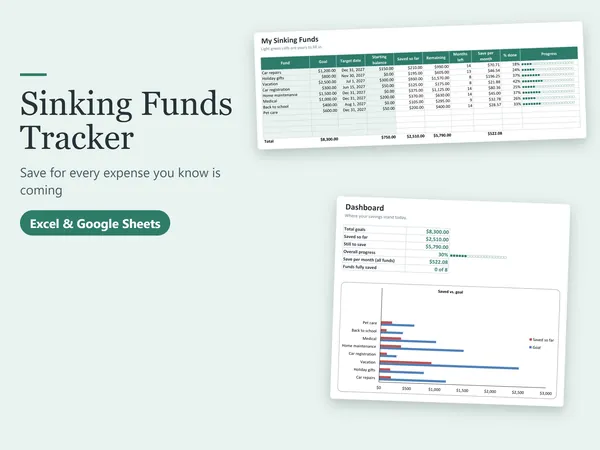 Sinking Funds Tracker
Save for planned expenses fund by fund, month by month.
-
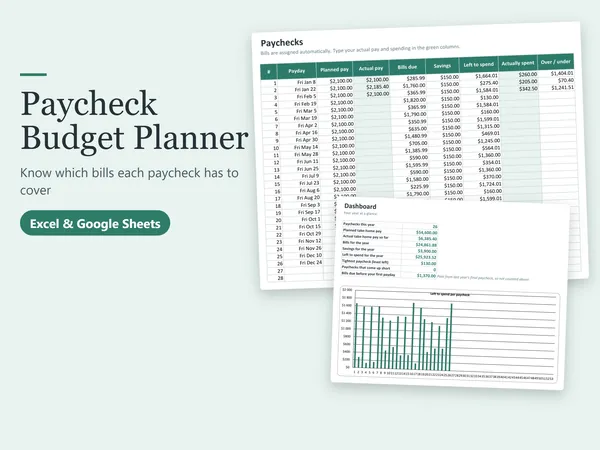 Paycheck Budget Planner
Plan every paycheck: bills, savings and spending in one view.
Budget & Money: buying guide
Two budget spreadsheets for households that want a plan for every paycheck. They suit anyone paid weekly, every two weeks, twice a month or monthly who wants to see bills and savings ahead of time instead of at the end of the month.
The Paycheck Budget Planner starts from your paydays. Choose your pay frequency, then enter your first payday of the year, your usual take-home pay and up to 30 monthly bills with their due days. The planner lists every payday of the year with the bills it covers, the amount you save and what is left to spend. Type in your actual pay and spending to compare with the plan: a shortfall turns red. A Bill Dates tab shows every due date of the year and the paycheck that covers it.
The Sinking Funds Tracker is for expenses you know are coming: car repairs, holiday gifts, a vacation, back to school. List up to 12 funds with a goal and a target date. The sheet works out how much to put aside each month and shows a progress bar for every fund. Add a line each time you move money in or out.
Both spreadsheets come with a filled-in example, a blank copy and a Google Sheets version. Use Google Sheets if you want to update your budget from your phone or share it with a partner. The files have no bank connection: you type in your own numbers.
Common questions
Which pay schedules does the paycheck planner support?
Weekly, biweekly, semi-monthly (the 15th and the last day of the month) and monthly pay.
What is a sinking fund?
Money you set aside a little at a time for a planned expense, so the full amount is ready when the bill comes. The tracker calculates the monthly amount for each fund from its goal and target date.
Does the budget connect to my bank account?
No. The spreadsheets have no bank connection. You type in your own numbers.