Inventory for Resellers & Makers
Track stock, costs, fees and profit for every item you make or resell, with a dashboard that shows what sells best.
-
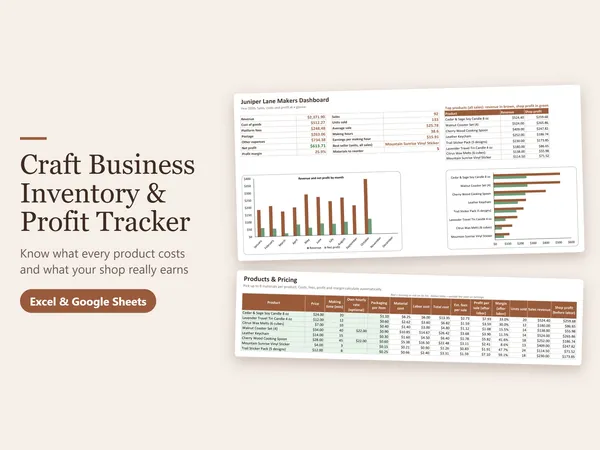 Craft Business Inventory & Profit Tracker
Materials, product costs, pricing and sales for makers.
-
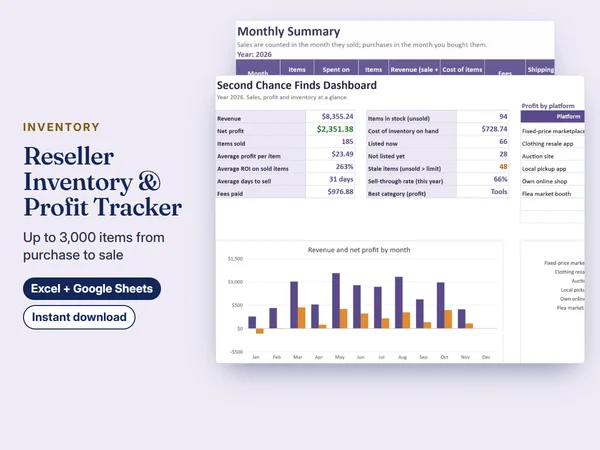 Reseller Inventory & Profit Tracker
Every item from purchase to sale, with fees, profit and ROI.
Inventory for Resellers & Makers: buying guide
These trackers are for people who sell physical goods: resellers who buy and flip items, and makers who sell what they create at markets or in an online shop. They answer a question most small sellers cannot answer from memory: what does each sale really earn after fees, postage and supplies.
Choose by how you get your stock. The Reseller Inventory & Profit Tracker follows each item from the day you buy it to the day it sells, for up to 3,000 items. It works out fees, profit, ROI and days to sell, and shows which platforms and categories earn the most. You can set up to 12 selling platforms, each with its own fee.
The Craft Business Inventory & Profit Tracker starts from your materials. Enter the pack price and the units in a pack, and it calculates the cost per unit. Each product is built from up to 8 materials, with your labor at your hourly rate, so you see the true cost and margin of everything you make. Stock goes down as you sell, and supplies below their reorder level turn red.
Marketplace fees change, so enter your own platform's current fees in the Settings tab. The fees in the example file are only an example. If you have the exact fee from a payout report, you can type it on the sale line instead.
Each tracker comes as a filled-in example and a blank copy in Excel, plus a Google Sheets version you can open on your phone while sourcing or at a craft fair.
Common questions
Which tracker is for resellers and which is for makers?
If you buy items to resell, use the Reseller Inventory & Profit Tracker. If you make products from supplies, use the Craft Business Inventory & Profit Tracker, which works out the material cost per unit and the cost of each product.
Does it work for in-person sales?
Yes. The craft tracker's sales log works for craft fair and market sales, and its Start Here tab explains in-person sales and refunds. In the reseller tracker, you name your own selling platforms in Settings.
Are marketplace fees filled in?
Only as an example. Enter your own platform's current percentage and fixed fee in Settings, so profit is calculated with the fees you actually pay.